Customer Journey Mapping Tools: What Marketing Teams Actually Need
Customer journey mapping tools solve very different problems. Learn when marketing, lifecycle, and CRM teams need diagramming, journey mapping, journey management, or communication-focused tools.
Customer journey mapping tools help teams visualize how customers move through a product, service, or experience. But the tools in this category solve very different problems.
Some are flexible canvases for workshops and diagrams. Others are purpose built for customer experience teams. Enterprise journey management platforms add structure, governance, research, and opportunity management.
For marketing, lifecycle, and CRM teams, there is another question worth asking:
Does the map show what the customer actually receives?
A journey containing a box labelled “Send welcome email” may accurately describe the workflow while leaving out the email itself. The same problem applies to SMS, in product messages, push notifications, and other communications.
The right customer journey mapping tool therefore depends less on which product has the longest feature list and more on what your team needs the journey map to do.
What is a customer journey mapping tool?
A customer journey mapping tool is software used to document and visualize the steps, touchpoints, decisions, and interactions that make up a customer experience.
At the simplest level, that can mean arranging stages and touchpoints on a visual canvas. More specialized platforms can also support personas, customer research, opportunities, metrics, ownership, collaboration, and governance.
For marketing teams, a useful journey may also need to answer questions such as:
- Which email does the customer receive at this step?
- What happens if that communication fails?
- Is the message still a draft or already live?
- What communication comes next?
- Why was this sequence designed this way?
- Who needs to review a change?
- Where does the communication belong in the larger customer experience?
Those requirements lead to several different categories of customer journey mapping software.
The main types of customer journey mapping tools
There is no single best customer journey mapping tool for every team. A useful starting point is identifying the job the tool needs to perform.
Visual collaboration and diagramming tools
Tools such as Miro and Lucidchart provide flexible visual canvases for diagrams, workshops, brainstorming, process maps, and customer journeys.
They are useful when the primary goal is to visualize a process and collaborate around it. Their flexibility also means they can be used for many other types of work.
For teams that mainly need to answer “How does this journey work?”, a general diagramming platform may be enough.
Dedicated customer journey mapping tools
Dedicated journey mapping platforms are designed specifically around customer experience work.
Rather than starting with a general purpose canvas, these tools tend to provide structures for journey stages, touchpoints, personas, customer needs, pain points, research, and other CX concepts.
They are useful when journey mapping itself is an established discipline within the organization.
Journey management platforms
Journey management goes beyond creating an individual map.
These platforms are designed for organizations managing many journeys across teams, products, personas, or business units. The emphasis shifts toward maintaining a connected journey framework, coordinating opportunities, establishing ownership, and managing customer experience work over time.
For a large CX organization, that can be considerably more important than the flexibility of the underlying canvas.
Journey documentation for lifecycle and CRM teams
Lifecycle and CRM teams have a slightly different problem.
Their journeys often contain real customer communications: onboarding emails, SMS messages, push notifications, in product prompts, reminders, transactional messages, and nurture sequences.
A conventional journey map can show that those communications exist without showing the communications themselves.
That distinction becomes important when the team needs to understand not just where an email is sent, but which email is sent and what the customer actually experiences.
A journey map should show enough context to understand the journey
Consider email verification.
At a high level, the journey appears simple:
A customer creates an account. A verification email is sent. The customer clicks the link. The account is verified.
A diagram can represent that in a few boxes.
But mapping the actual experience raises more questions.
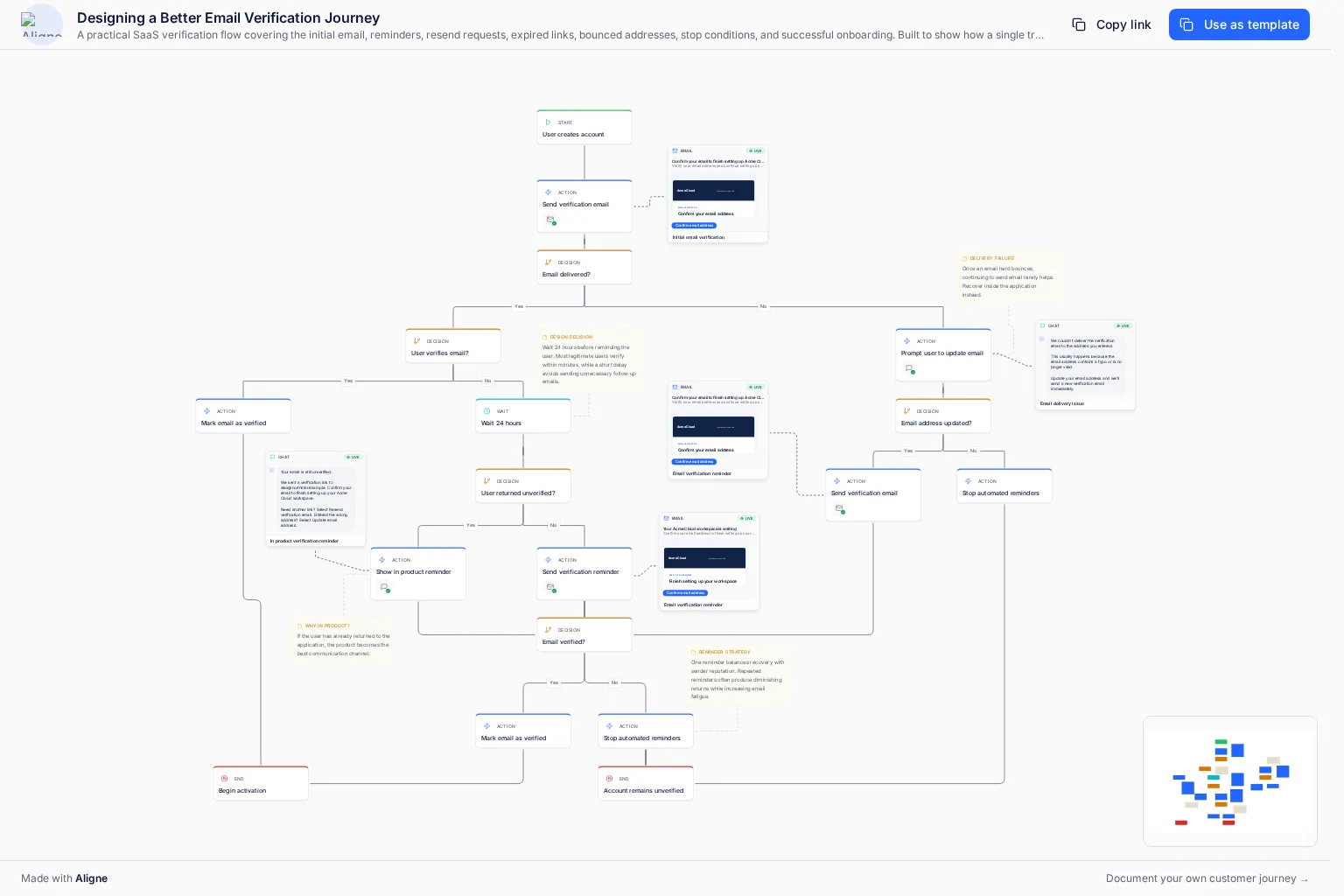
What happens if the email hard bounces? Should another verification email be sent if the customer does not respond? If the customer returns to the product before verifying, should the next reminder arrive by email or appear inside the product? What happens when the customer changes the email address? At what point should reminders stop?
The communication itself also matters. A box labelled “Send verification email” does not tell a reviewer what the subject line says, what the body copy contains, or whether that message is the one currently being used.
The example below maps those decisions as a complete fictional SaaS email verification journey.
Explore an interactive email verification customer journey showing the sign-up trigger, verification email, reminder logic, in-product prompts, bounce recovery, and exit states.
The point is not that this represents the one correct way to design email verification.
It demonstrates something more general: customer journeys become easier to understand when the workflow and the communications customers receive can be reviewed together.
An email is one communication. The journey is everything happening around it.
What should marketing teams look for in customer journey mapping software?
The answer depends on how the team works, but several questions are useful when evaluating tools.
Can you represent the actual workflow?
The tool should make it possible to document steps, branches, decisions, handoffs, exceptions, and outcomes at the level of detail your team needs.
A high level journey map may be sufficient for an executive presentation. A lifecycle team troubleshooting an onboarding sequence may need considerably more detail.
Can you see the customer communications?
For communication heavy journeys, ask whether the map can contain the actual emails, SMS messages, push notifications, or other content customers receive.
Otherwise, the map may become another layer of documentation pointing toward the systems where the real work lives.
Can the team understand what is current?
Customer journeys change.
Messages are rewritten. Timing changes. New branches are introduced. Old communications are retired.
If the journey is intended to serve as ongoing documentation rather than a workshop artifact, teams need a reliable way to understand its current state and history.
Can people review and discuss the journey together?
Journey work crosses functional boundaries.
Lifecycle Marketing may own the communication. Product may own the trigger. Engineering may implement the event. Legal or Compliance may need to approve the copy. Customer Success may understand an edge case nobody else considered.
Comments, reviews, approvals, and shared access become more valuable as the number of people involved increases.
Can stakeholders access it without becoming editors?
Not everyone who needs to understand a journey needs to modify it.
Consider how the tool handles viewers, sharing, published journeys, and access for stakeholders outside the core team.
Will the journey remain useful after the workshop?
This may be the most important question.
A journey map can be excellent during a workshop and useless six months later.
If the team intends to use the journey as operational documentation, consider who will maintain it, how changes will be reviewed, and whether the format makes keeping it current realistic.
Customer journey mapping tools to consider
Several established products approach these problems from different directions. The right choice depends on the work your team is trying to accomplish.
Miro
Miro is a broad visual collaboration platform rather than a dedicated customer journey product. Its flexible canvas makes it useful for workshops, brainstorming, diagrams, journey maps, and many other collaborative exercises.
For teams that want a general purpose visual workspace and already use Miro extensively, that flexibility can be a major advantage.
If the challenge is specifically maintaining customer communications and their workflow context together, the requirements are different.
Read the full comparison: Aligne vs Miro for customer journey mapping.
Lucidchart
Lucidchart is a diagramming platform suited to structured flowcharts, process diagrams, and other visual documentation.
It can be a strong choice when the primary requirement is clearly documenting how a process works.
Marketing teams should consider whether they need the diagram itself or an ongoing view of the workflow together with the communications customers receive.
Read the full comparison: Aligne vs Lucidchart.
UXPressia
UXPressia is purpose built around customer experience work, including customer journey maps and personas.
That makes it fundamentally different from a general diagramming platform. Teams focused on researching, designing, and presenting customer experiences may prefer that specialized structure.
Teams whose primary problem is managing the marketing communications operating inside those journeys should evaluate that requirement separately.
Read the full comparison: Aligne vs UXPressia.
TheyDo
TheyDo approaches the category as journey management rather than simply journey mapping.
That makes it particularly relevant to organizations trying to coordinate customer experience work across a larger journey framework.
For smaller lifecycle or CRM teams, the question is whether they need enterprise journey management or a more focused way to document workflows and the customer communications attached to them.
Read the full comparison: Aligne vs TheyDo.
Aligne
Aligne is designed for teams that need journey logic, what customers actually see, and what customers actually receive in the same shared view.
Each step can carry a product screen showing the real interface at that point, and emails, SMS messages, and other communications can live directly alongside the steps that trigger them. Teams can also collaborate around the journey with comments, reviews, approvals, version history, and shared access. Product Screens are available on every plan, and Team workspaces add Product Screen History for governance.
That makes Aligne particularly relevant to lifecycle, CRM, marketing operations, product, and other teams trying to answer questions such as:
- What does the customer see here?
- What does the customer receive here?
- Which communication is live?
- Why does this branch exist?
- What changed?
- Who reviewed it?
Aligne is not intended to replace every type of journey mapping software. A team primarily running collaborative workshops may prefer a general visual workspace. A mature enterprise CX organization may need a broader journey management platform.
The distinction is the problem being solved.
How to choose the right customer journey mapping tool
Start with what needs to remain true after the map has been created. If you are unsure how dependable your current journeys are, start by evaluating your customer journey maturity.
If you mainly need a flexible canvas for workshops and diagrams, a general visual collaboration tool may be the simplest choice.
If customer journey mapping is a formal CX practice built around personas, research, pain points, and experience design, consider a dedicated journey mapping platform.
If your organization manages a large portfolio of connected journeys and opportunities, journey management software may be more appropriate.
If your team works directly with lifecycle and CRM communications and needs to understand the workflow, the actual messages, their status, and the collaboration around them, look for a tool designed to keep that context together.
The mistake is treating all four problems as though they are the same.
Frequently asked questions
What is the best customer journey mapping tool?
There is no single best customer journey mapping tool for every organization. Miro and Lucidchart are useful for flexible visual mapping and diagramming. Dedicated CX platforms such as UXPressia focus more specifically on journey mapping, while platforms such as TheyDo address broader journey management. Aligne is designed for teams that want journey logic, product screens, customer communications, and stakeholder review together in the journey.
The best choice depends on whether your primary requirement is diagramming, experience design, journey management, or operational documentation of what customers see and receive.
What should a customer journey map include?
A customer journey map typically includes stages, customer actions, touchpoints, decisions, channels, and outcomes. Depending on the purpose of the map, it may also include personas, pain points, customer needs, ownership, metrics, product screens, communications, comments, approvals, and other operational context.
The map should contain enough information to answer the questions the team actually uses it for.
Can Miro be used for customer journey mapping?
Yes. Miro’s flexible visual canvas can be used to create customer journey maps and is particularly useful for collaborative workshops and teams that want a general purpose visual workspace.
Teams that need specialized CX structures or want the actual customer communications managed alongside the workflow may require additional capabilities.
What is the difference between journey mapping and journey management?
Journey mapping focuses on visualizing and understanding a customer experience. Journey management treats journeys as ongoing organizational assets that need to be maintained, connected, governed, measured, and acted upon over time.
A team creating several maps for workshops has different requirements from an organization managing a large portfolio of interconnected customer journeys.
What is the difference between a flowchart and a customer journey map?
A flowchart primarily describes how a process moves between steps and decisions. A customer journey map describes the experience from the customer’s perspective and may include touchpoints, channels, goals, pain points, communications, and other contextual information.
The two can overlap. A detailed customer journey may use flowchart logic to document branches and decisions while also capturing what the customer experiences at each step.
The map is only useful if the team can use it
Customer journey mapping software should make the customer experience easier to understand, not simply produce a better looking diagram.
For some teams, that means a flexible canvas. For others, it means structured CX research or enterprise journey management.
For lifecycle, CRM, and marketing teams, it may mean something more concrete: being able to open the journey and see the communications customers actually receive, the decisions around them, and the context needed to understand what is happening.
The right tool is the one that keeps the information your team needs close enough to the journey that people will actually use it.
Try Aligne with your team
Bring journey logic, product screens, and customer communications into one shared view. Free to start, no credit card required.