Designing an Email Verification Journey
Mapping a fictional SaaS email verification journey uncovered far more product decisions than expected. Explore the interactive flow and the design decisions behind it.
Every SaaS product I've worked on has some form of email verification.
A user signs up, receives an email, clicks a button, and their account is activated.
Or at least that's how I would have described it.
Recently, while building sample customer journeys for Aligne, I decided to map a fictional email verification process from start to finish. My goal wasn't to create the "perfect" verification flow. I simply wanted a realistic example that could be shared publicly and used as a discussion piece.
I expected a handful of nodes.
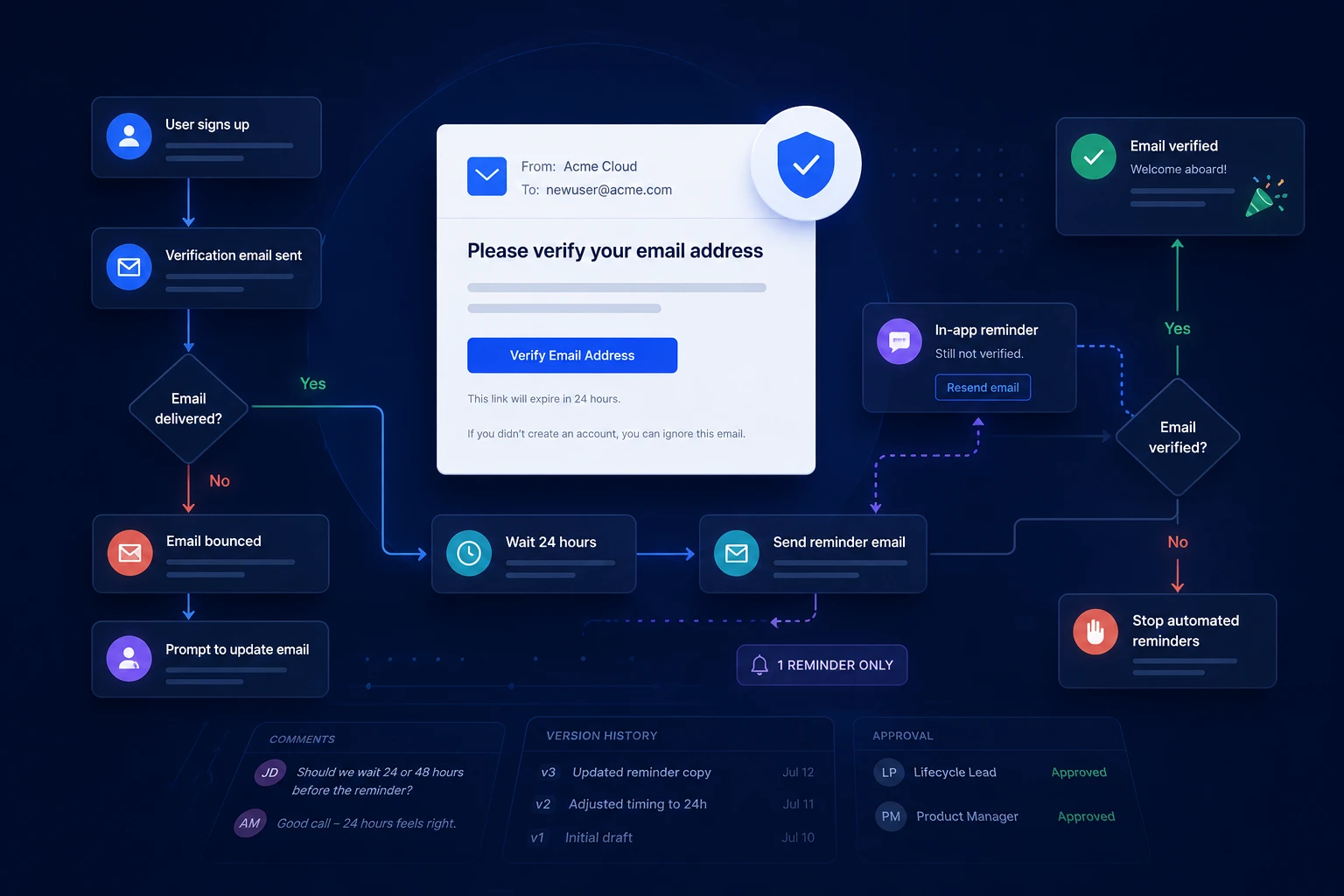
Instead, I ended up with this.
Explore an interactive email verification customer journey showing the sign-up trigger, verification email, reminder logic, in-product prompts, bounce recovery, and exit states.
The surprising part wasn't the size of the flow.
It was the number of product decisions hiding behind what I'd always thought of as "sending a verification email."
A verification email isn't the journey
Before mapping this out, if someone had asked me how email verification worked, I probably would have answered:
We send a verification email.
Looking at the completed journey now, that answer feels incomplete.
The email is simply one communication.
The customer journey includes everything that happens after that email is sent, regardless of whether the customer opens it, ignores it, mistypes their email address, returns to the application, or never verifies at all.
Once I started thinking about the customer instead of the email, the flow grew naturally.
The questions I hadn't considered
As the flow expanded, I found myself asking questions I'd never consciously documented before.
- What happens if the verification email hard bounces?
- Should there be a reminder email?
- If the user returns to the product before verifying, should the reminder come from email or from inside the application?
- If they correct their email address, does the journey restart?
- At what point do we stop trying?
None of these questions are especially difficult.
What surprised me is that I've worked on several SaaS products over the years, yet I can't remember having many discussions around them.
That isn't necessarily a criticism.
Product teams have limited time. There are always bigger problems competing for attention.
But visualizing the journey forced me to answer questions that otherwise would have remained assumptions.
Why this version looks the way it does
This isn't intended to be a reference implementation or a definitive set of best practices.
It's simply the collection of decisions I arrived at after thinking through the customer experience.
One reminder email
My first instinct was to send multiple reminder emails.
The more I thought about it, the less I liked the idea.
Most users who intend to verify their email will usually do so fairly quickly. Repeated reminders increase email volume while offering progressively smaller gains.
For this example, I settled on a single reminder after 24 hours.
That felt like a reasonable balance between helping legitimate users and respecting their inbox.
Switching communication channels
One decision surprised me.
If a user has already returned to the application before verifying their email, should they receive another email?
Probably not.
At that point, the product itself becomes the better communication channel.
Instead of sending another email, the journey displays an in-product reminder with options to resend the verification email or update the email address.
The communication happens where the customer already is.
Recovering from delivery failures
One branch handles a hard-bounced verification email.
Continuing to send reminders doesn't solve that problem.
Instead, the product prompts the customer to update their email address. Once it's corrected, a fresh verification email is sent and the journey continues.
It's a relatively small branch, but one that completely changes the recovery experience.
Knowing when to stop
Every automated journey needs an exit.
In this example, automated reminders stop after a single reminder if the user still hasn't verified.
The account remains unverified, but the customer can resume verification later from inside the application.
Again, this isn't the only reasonable decision.
It's simply the one that made the most sense after mapping the entire experience.
The biggest takeaway
When I started this exercise, I thought I was documenting an email.
By the end, I realized I was documenting a customer journey.
That distinction matters.
An email is one communication.
A journey is every state the customer can move through until they either reach their goal or abandon the process.
Looking at the completed flow, I don't think I'd describe email verification as "we send a verification email" anymore.
There are simply too many product decisions hiding behind that sentence.
Whether every company needs a journey like this is another question entirely.
But I do think every team benefits from making those decisions intentionally rather than discovering them by accident months later.
Use this journey as a template
The finished journey is available as a reusable template: Email Verification Customer Journey Map Template. Open it, explore the branches, and copy it into your own workspace.
Try Aligne with your team
Bring journey logic, product screens, and customer communications into one shared view. Free to start, no credit card required.