The Aligne Platform
Where journey logic, product screens, communications, and review finally live together.
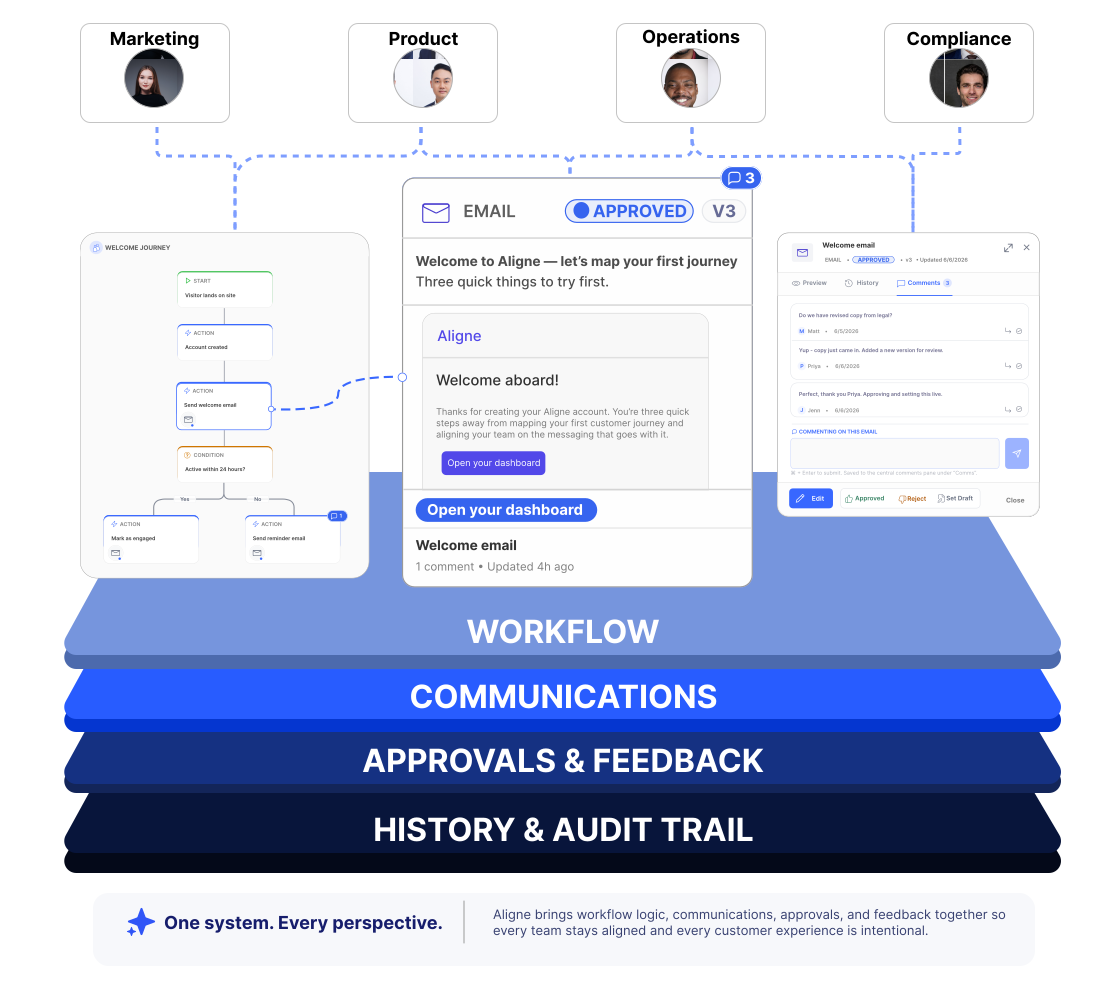
See what customers do, what they see on screen, and what they receive — all in context. Review changes where the work happens and keep a complete history of what was reviewed, what changed, and why.
The Consequence
When the workflow and the message live apart, the customer feels it first.
Drift
Process diagrams update. The emails customers actually receive do not.
Distance
Reviews happen in docs, threads, and decks — far from the step they govern.
Doubt
No one is certain what shipped, who approved it, or what changed last week.
Our Point of View
Journey logic, the screens customers see, the messages they receive, approvals, and feedback belong in one operational view. Aligne is where they finally live together.
How Aligne Works
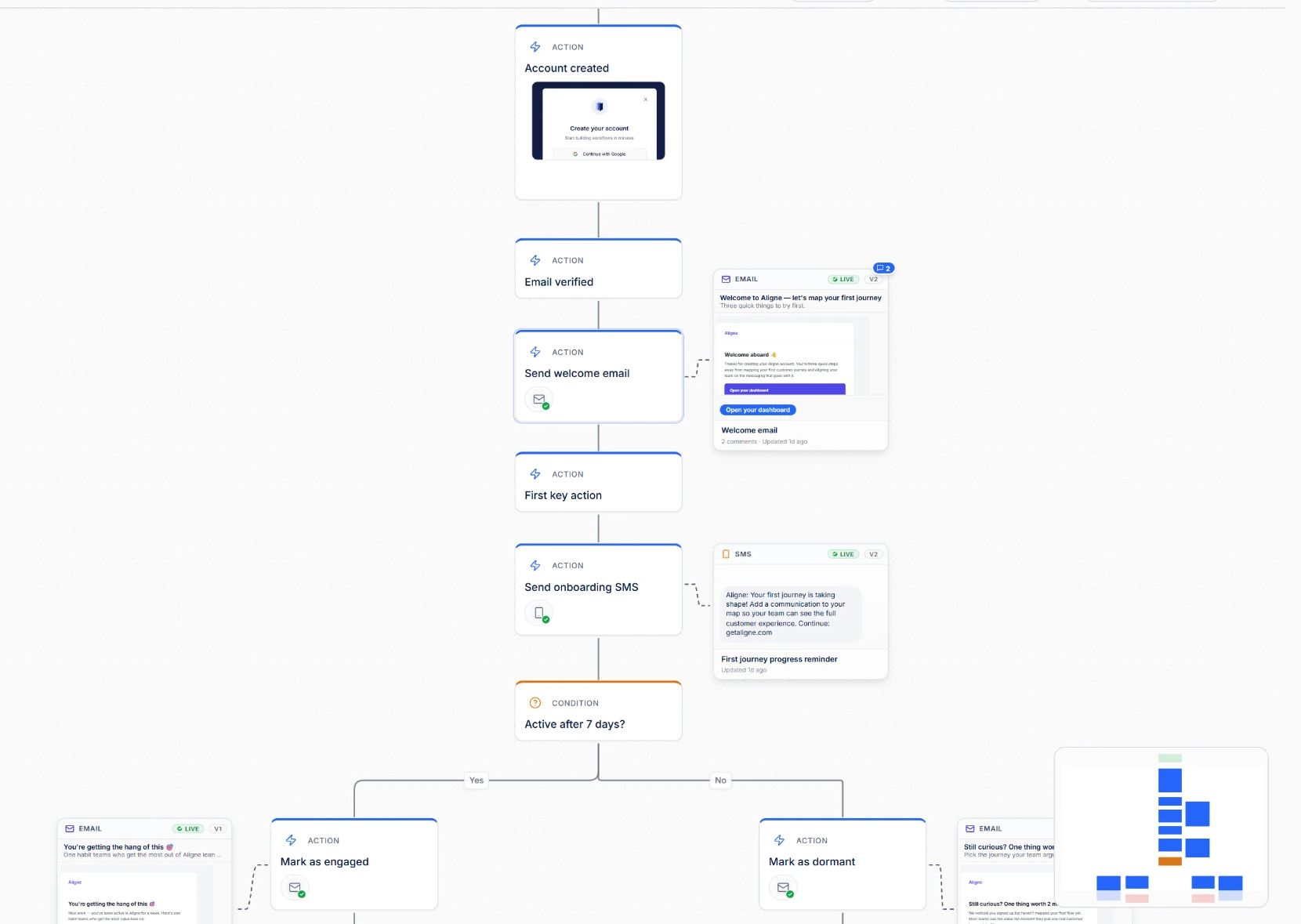
Map the journey, attach the screens customers see and the real communications they receive, review together, and track every revision in one shared view.
Workflow
01
Map the journey.
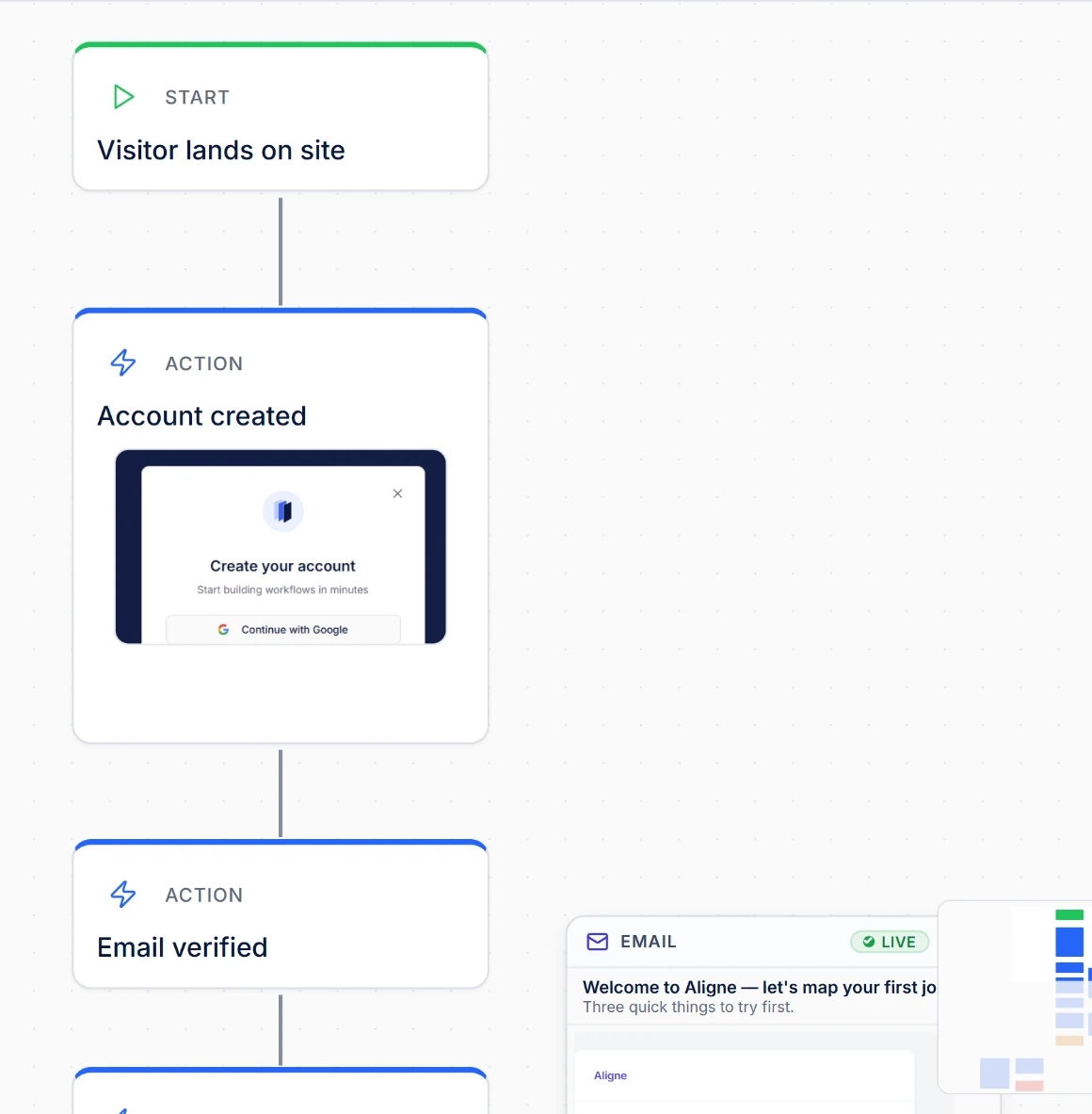
Lay out the customer journey with typed nodes — triggers, actions, waits, decisions — then attach the screen customers see at that step and the exact message it sends.
Communications
02
See exactly what customers receive.
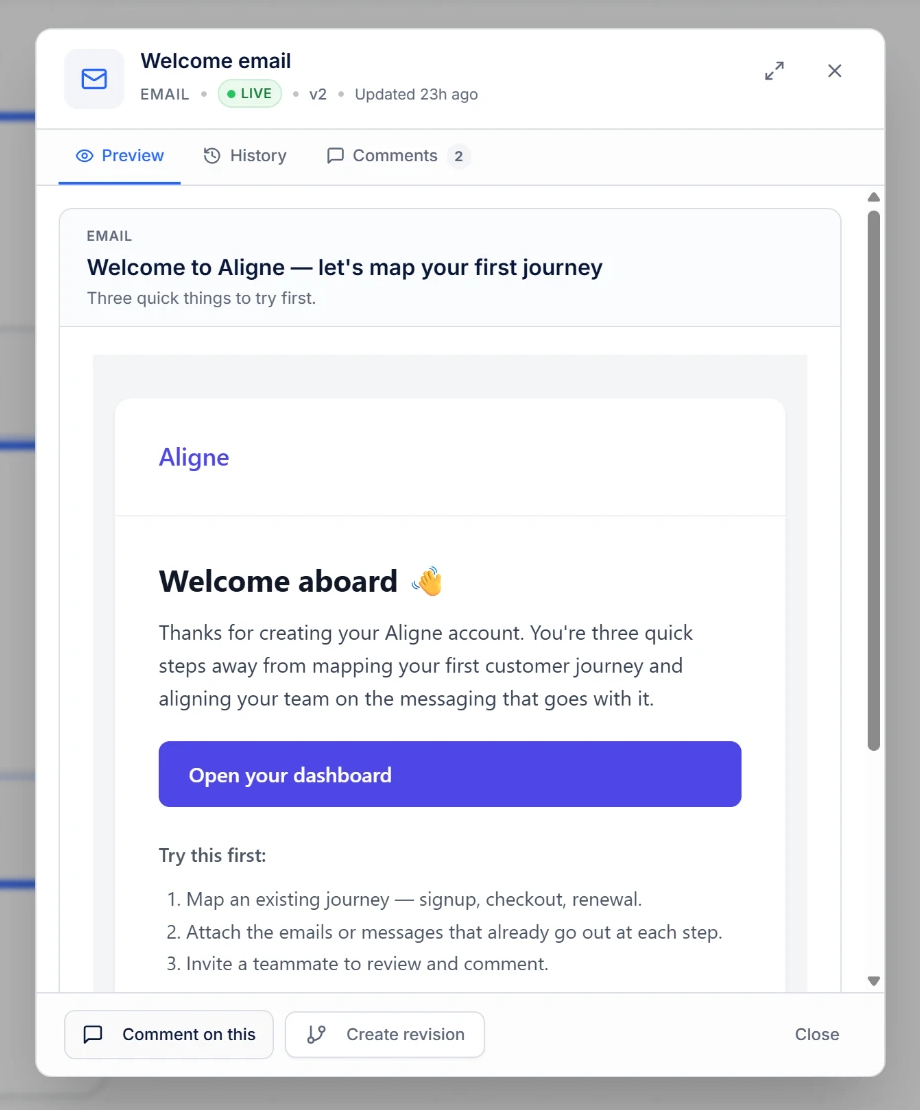
Preview the exact message customers receive, directly beside the journey that triggers it. Standardize email, SMS, chat, push, documents, and custom communication types in one place.
Approvals and feedback
03
Review together.
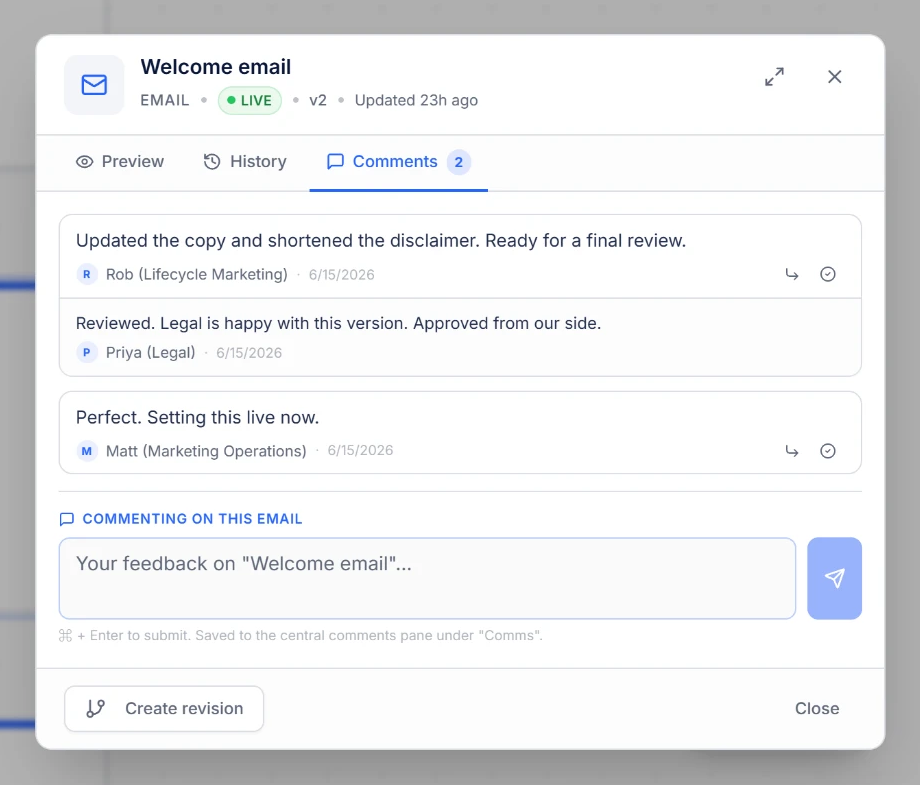
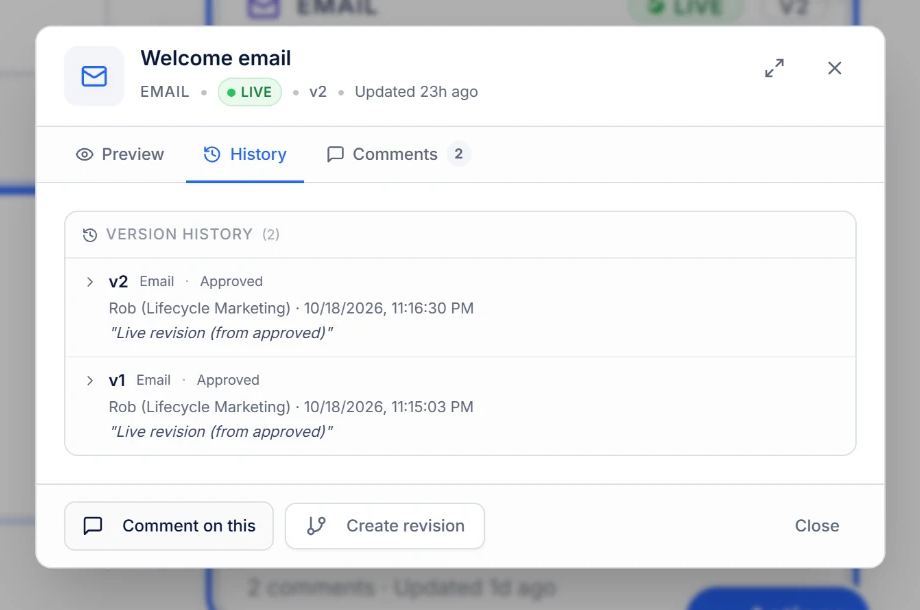
Comments land on the exact communication that needs attention, and review states move messages from draft to live in context — replacing scattered Slack threads and forwarded email chains.
History and audit trail
04
Track every revision.
Every approved revision is preserved, timestamped, and attributed — so you can see what was live on any date and roll back when you need to.
Product Screens
Show the screen the customer is actually looking at.
Most journey maps describe a step. Product Screens attach the real interface to it. The current screen sits inside the journey node on the canvas, so the team sees what the customer saw at that moment — without leaving the journey to hunt for a screenshot.
Attached to the step
Product Screens attach directly to journey nodes. The current screen appears inside the node and opens to the full, uncropped view.
Dated and sourced
Each capture can carry the date the screen represents and the source URL it came from, so context travels with the image.
Previous captures preserved
Uploading a newer capture makes it the current screen. Earlier captures are kept in Screen History, never overwritten.
On every plan
Product Screens are available on Free, Pro, and Team, so any team can document the experience as it exists today.
Screen History on Team
Reviewing previous captures is a Team governance capability. Free and Pro keep the captures; Team can browse them.
Private to the workspace
Product Screens stay with authenticated workspace members. They are not included in public shares or embeds.
Screens are uploaded by your team, so the journey shows exactly the moments you choose to document alongside the communications customers receive.
Import
Your journey doesn’t have to start from scratch.
Most teams have already documented the journey somewhere. Fill in the Aligne Excel template and import it — the result is a real, editable Aligne flow, laid out for you automatically. Available on every plan, including Free.
Bring the structure
Steps, connections, branch labels, and step types — start, action, decision, wait, condition, end, and annotation — come across as connected nodes on the canvas.
Bring the communications
Attach messages to the steps that send them, with channel, title, subject, preview text, body, call to action, and notes.
Keep working in Aligne
Once imported, edit, comment, review, version, share, and publish exactly as you would with a flow built on the canvas.
Imports use the Aligne Excel template, so the structure is understood exactly. A single workbook can carry up to 500 steps and 2,000 rows of data in total. If drafting the workbook is the slow part, an external assistant such as ChatGPT can help you fill it in before you upload — Aligne imports what you provide, and does not connect to, sync with, or verify anything against your source systems.
Built for Operational Discipline
The platform behaviors enterprise teams expect.
Aligne is built for teams that need to know what shipped, who reviewed it, and how it changed.
Governance
Defined review states and communication status on every customer communication.
Visibility
A single canvas where every stakeholder sees the same journey, the same screens, and the same messages.
Accountability
Review status attached to the exact step and the exact version that shipped.
Reviewability
Comments resolve against specific nodes and messages — never lost in a thread.
Auditability
Version history on every communication, so the record of what changed is always intact.
Collaboration
Viewer-safe sharing for legal, compliance, leadership, and partners — without edit risk.
Where Aligne Fits
Not a flowchart tool. Not a whiteboard. Not a project tracker.
Most tools document that a message exists. Aligne keeps the actual message connected to the workflow that sends it — so teams always see which message, who reviewed it, and how it changed.
Lucidchart, Visio, draw.io
Diagram the workflow. The actual email or SMS lives in another system, and no one can review it from the diagram.
Miro, FigJam
Great for brainstorming. Not built for typed workflow logic, structured reviews, or versioned customer communications.
Jira, Asana, Linear
Track tasks and tickets. They have no concept of the customer journey or the message a customer actually receives.
ESP & CDP dashboards
Show campaigns in isolation. They cannot map the end-to-end journey or the cross-channel context stakeholders need to review.
Customer journey mapping platforms
Smaply, UXPressia, and Custellence excel at journey visualization, personas, and experience mapping. Aligne is built for operational customer workflows, keeping the actual emails, SMS, and documents attached directly to each workflow step, alongside comments, review states, and version history.
Want the deeper breakdown? See how Aligne compares with the tools teams already use.
View comparisonsWho Aligne Is For
The shared canvas for everyone responsible for what customers receive.
Marketing Operations
Align brand, content, and channel owners on the exact messages going out — before they reach the ESP.
Customer Lifecycle
Design onboarding, activation, and retention journeys with every nudge reviewed in sequence.
Compliance & KYC
Review the exact wording customers receive, in the context of the step that triggers it, with version history for audit.
Customer Success
Document escalation paths and resolution messages so every touchpoint sounds like one company.
Product Operations
Map in-app flows and the notifications that support them, so product and lifecycle stay on the same page.
Internal Operations
Keep internal alerts and external customer comms in the same map so nothing drifts as processes change.
See the whole story before your customers do.
Map your first journey, attach the real screens and messages, and invite reviewers in minutes. Free to start.