Why General-Purpose Graph Layout Isn't Enough for Journey Maps
What we learned building automatic layout for spreadsheet-imported customer journeys: semantic topology, local ELK layout, deterministic composition, and why meaning mattered more than the algorithm.
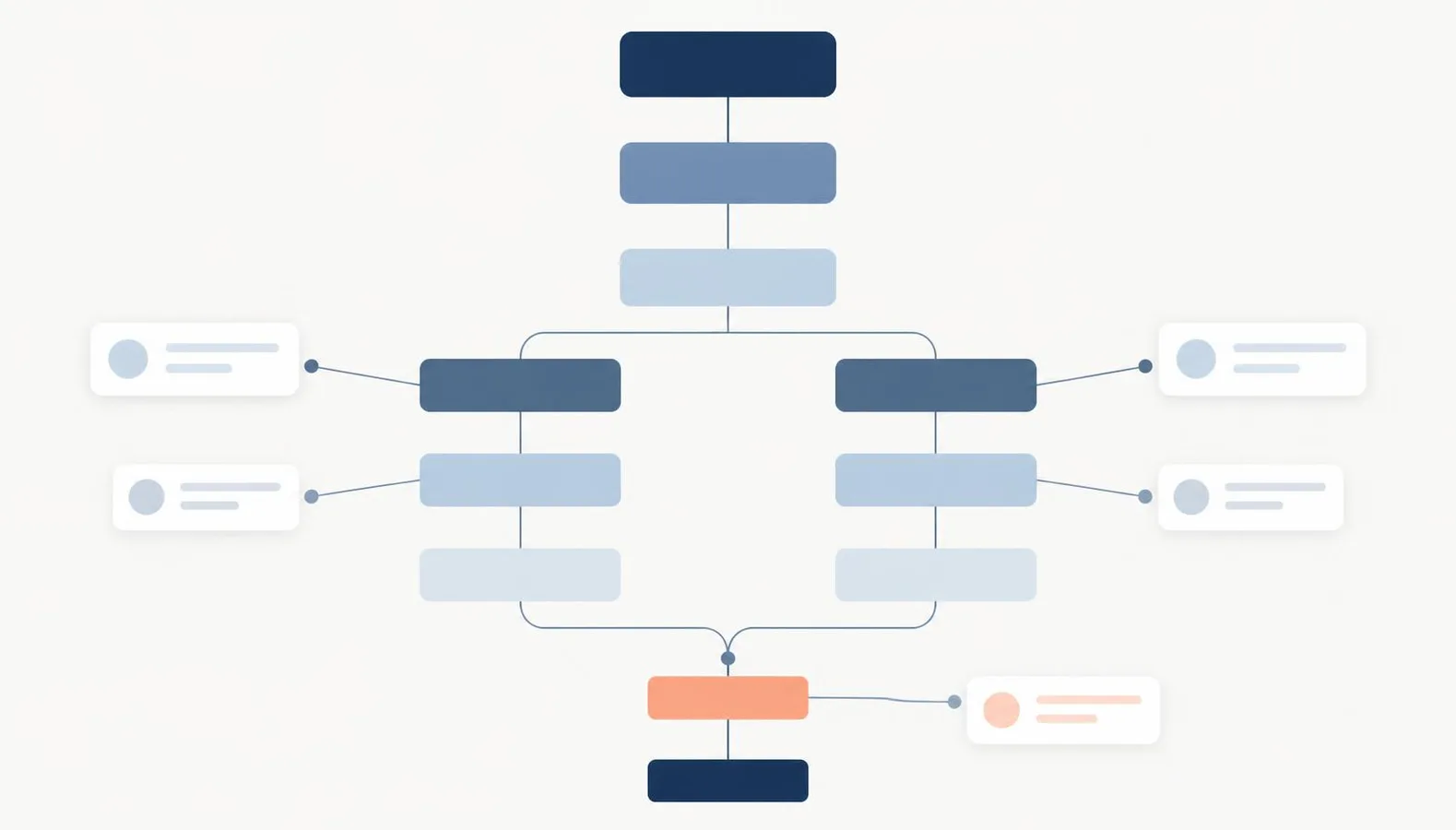
We thought this would take a day.
The idea was simple: let someone describe a customer journey in a spreadsheet, import it into Aligne, and turn the rows into an editable flowchart. Steps in one sheet, connections in another, the emails and SMS messages in a third.
Reading the spreadsheet wasn't the hard part. Figuring out where everything should go was.
Roughly seven days later we had a working architecture, several abandoned approaches, and one conclusion that turned out to matter more than any algorithm choice:
The layout engine wasn't the answer. Knowing what the diagram meant was the answer.
Importing the spreadsheet wasn't the hard part
Parsing a structured spreadsheet is ordinary work. You validate sheet names and column headers, check that every connection references a real step, reject duplicate IDs, and produce a typed object graph: nodes, edges, and communications attached to steps.
At that point you have a correct description of a journey and no diagram at all. The interesting problem starts one line later:
Given a structured description of a marketing journey, how do you automatically produce a diagram a human can immediately understand and then keep editing?
Those two requirements pull in different directions. "Understandable" is a human judgement. "Editable" means the output has to behave like something a person drew, not like the output of a solver that will rearrange itself the moment anyone touches it.
That work now powers spreadsheet import in Aligne: a structured Excel or CSV journey can be turned into an automatically arranged, editable journey map. The rest of this article is how we got there, including the parts that didn't work.
A valid graph isn't necessarily a readable journey
The most useful thing we learned early is that graph-quality metrics and human readability are not the same measurement.
We produced layouts that had:
- zero node overlaps
- zero edge-node collisions in the static render
- correct branch ordering
- fully deterministic output for the same input
And we looked at them and immediately said: that's a bad journey map.
Nothing in that metric list captures "this reads top to bottom like a lifecycle," "the Yes path is on the left where I expect it," or "the shared continuation stayed on the main column instead of wandering 700 pixels to the right." A graph can be geometrically valid and semantically unreadable.
If you are building automatic layout for a domain-specific diagram, that gap is the thing to design around. Optimising the metrics harder does not close it.
What a graph engine doesn't know about a customer journey
General-purpose layout engines understand nodes, edges, ranks, ports, layers, crossings, and spacing. They are very good at that. What they don't have is the visual grammar a marketing or lifecycle journey is read with.
In Aligne, that grammar is roughly:
- A dominant vertical lifecycle that progresses from top to bottom.
- Decisions that temporarily branch away from that lifecycle.
- Boolean decisions where Yes belongs on the left and No belongs on the right.
- Nested decisions that belong inside their parent branch, not floating somewhere else on the canvas.
- Deliberate reconvergence back into the lifecycle.
- Communication cards, such as emails, SMS, chat, and in-product messages, that behave like satellites attached to a workflow step rather than ordinary graph nodes in the flow.
- Readability mattering more than minimising the bounding box.
None of that is inferable from the graph alone. A layer-based algorithm has no reason to prefer "Yes on the left." It has no concept of a lifecycle spine, because in graph terms the spine is just another path. And it will happily treat a communication card as a first-class node that deserves its own rank, which is exactly what you don't want: the email is a detail of the step, not a stage of the journey.
So: what makes automatic layout for a customer journey different from generic graph layout? Generic layout optimises graph geometry. A journey map has to preserve domain meaning, and that meaning has to come from the application, because the graph doesn't carry it.
Our first approach: own the layout ourselves
The first implementation was fully custom and deterministic. Aligne analysed ranks, branch ownership, convergence points, terminals, and nested decisions, then placed everything itself, followed by compaction and repair passes.
It worked, in the sense that we controlled every coordinate and could encode every rule we cared about. It also drifted steadily into geometry-repair whack-a-mole. Each new graph shape produced a new class of collision, which produced a new repair pass, which occasionally undid an earlier one. We built plateau escapes, snapshot-and-revert protection for compaction, and a global repair stage, and we were still finding shapes that needed another special case.
The conclusion wasn't "custom layout is wrong." It was narrower:
Aligne should own domain semantics. It should not try to become a general-purpose graph geometry engine.
Layered graph layout is a solved-enough problem with mature implementations. Re-deriving it inside a product is a bad use of engineering time.
What happened when we gave the whole graph to ELK
So we tried the obvious alternative: hand the entire journey to the Eclipse Layout Kernel, using its layered algorithm, in the same way the React Flow layouting guide demonstrates.
ELK did its job. The layouts were valid layered graphs. They were also not journey maps.
Global layout distributed the graph the way a layered algorithm should: by ranks and crossing reduction, across the whole structure at once. The lifecycle stopped being a visible spine. Branch sides were assigned by whatever minimised crossings rather than by Boolean meaning. Communications competed with workflow steps for layer space.
This is not a criticism of ELK. It is doing the graph-layout job it was designed to do, and the option reference gives you a lot of control over how it does it. The gap is that we were asking a general engine to infer domain meaning it was never given.
We did also hit a concrete compatibility detail worth recording, because it cost us time: some layout options that exist in ELK's Java API are not accepted by the JSON importer used by the JavaScript build. Passing them raised an exception per graph, our code logged it as a warning, and layout silently fell back. If you integrate elkjs, make layout failure loud. A swallowed exception looks exactly like a bad algorithm.
Compound groups helped, but not enough
The next attempt kept global ELK but added structure: compound nodes for decision regions, grouped branches, and stronger ordering constraints.
Formal metrics improved. Overlaps went to zero, branch ordering became stable, and output stayed deterministic. But the macro structure of the journey was still being decided by the layout engine, and the macro structure is the part a reader uses to orient themselves. Constraining a general engine hard enough to reproduce a specific visual grammar mostly means fighting it.
That was the point where the architecture changed.
The breakthrough: separate meaning from geometry
The version that worked splits responsibility in two.
Aligne owns semantic macro composition. ELK owns local geometry inside bounded regions.
The pipeline, conceptually:
- Structured journey (parsed spreadsheet rows).
- Semantic topology analysis.
- Identify the lifecycle, the main spine of the journey.
- Identify Decision regions and which nodes each branch exclusively owns.
- Run local ELK layout inside each bounded region.
- Compose those regions deterministically along the lifecycle.
- Attach communication cards as satellites of their workflow step.
- Normalise all positions onto Aligne's canvas grid.
- Materialise the editable flow.
The dominant lifecycle is never something ELK has to discover, because Aligne already knows it. Yes-left and No-right are not emergent properties of crossing minimisation, they are constraints applied during composition. ELK is asked a much smaller and much more appropriate question: given this bounded set of nodes and edges, arrange them cleanly.
Why wasn't global ELK layout enough? Because the macro structure of a journey map is semantic, and only the application knows the semantics. Give the engine a scoped geometric problem and it is excellent. Give it the whole diagram and it will optimise for properties that are not the ones a reader cares about.
Aligne owns meaning. ELK owns geometry.
That sentence is the actual architectural principle, and it has a useful test attached: when something looks wrong, ask whether the defect is geometric or semantic before reaching for a fix.
A real example. In one build, the main spine drifted sideways after a nested decision: the first few lifecycle steps sat on the main column, then several later steps jumped several hundred pixels right, then the journey snapped back. Every geometric metric was clean. No overlaps, no collisions, deterministic output.
The cause was ownership. A local Decision region had effectively claimed a shared continuation node, a step that belongs to the lifecycle and is merely reached from inside a branch. Because the region owned it, the region's local horizontal origin leaked outward and dragged the rest of the lifecycle with it.
The fix was not another geometric repair pass. It was a semantic correction: shared continuations belong to the macro lifecycle, not to the local Decision region that happens to reach them first. Once ownership was assigned correctly, the drift disappeared, along with the long lateral edge and the vertical gap it had created.
Geometry-shaped bugs frequently have semantic causes. Repairing them geometrically is how you end up back in whack-a-mole.
The edge-routing experiment that made the editor worse
Once placement was good, some orthogonal connectors still passed through unrelated nodes. The obvious next step was obstacle-aware routing: let each edge see the other nodes and route around them.
Statically, this improved collision counts. Interactively, it was clearly worse.
Because every edge's corridor depended on every obstacle, moving something unrelated could reroute a connector you weren't touching. We reproduced a case where nudging an unrelated node by about a pixel caused a connector corridor to jump by hundreds of pixels on the other side of the canvas. Editing stopped feeling like direct manipulation and started feeling like poking a simulation.
So we removed live obstacle-aware rerouting from the shared editor renderer. The current editing principle is deliberately boring:
- Moving a node updates the edges connected to that node.
- Moving an unrelated object does not make unrelated connectors jump.
The tradeoff is explicit. In this version, some generated connectors may still cross a node. We decided a predictable canvas is worth more than a lower collision count, because the first thing a user does with an imported journey is edit it.
The general lesson: static automatic-layout quality and interactive editing stability are separate optimisation problems. A routing strategy that scores well on a still image can be the wrong strategy for a live editor. Explicit rerouting controls, an Auto Arrange action, or persisted stable waypoints are all reasonable future directions; none of them are implemented today.
Small details matter: snapping to the editor grid
The generated layouts were mathematically fine but did not always land on Aligne's 20px canvas grid. Manually created flows do. The mismatch was subtle and it made imported journeys feel slightly off, with connectors meeting nodes at marginally wrong offsets.
Final imported positions are now normalised onto the same grid the editor uses.
There was one semantic edge case hiding in that rounding. A branch root sitting slightly to the correct side of its Decision could round onto the Decision's exact X coordinate, which quietly destroys the Yes-left / No-right relationship the reader depends on. Rather than adding another generic repair, we added a narrow semantic guard: if grid quantisation would collapse an otherwise valid Boolean branch relationship, the affected exclusive branch region is translated by one grid cell in the required direction. Shared convergence nodes stay on the macro lifecycle.
Same pattern again. Semantics decide the correction.
Testing it against a 46-step lifecycle
Toy graphs prove nothing. Our main stress test is a deliberately hostile journey of roughly 46 workflow steps, 55 connections, and 10 communication cards, containing nested decisions, direct branch bypasses, multiple reconvergences, terminal branches, long returns into the lifecycle, and several distinct lifecycle phases.
The result is not perfect. Some connector routing is still not what a person would draw. But the semantic structure held: the lifecycle read top to bottom, branches stayed on their correct sides and inside their parents, convergences landed back on the spine, and the whole thing was editable without first having to untangle it.
That was the moment the architecture felt viable rather than tuned to one happy-path fixture.
What this means for AI-generated journeys
The same separation applies well beyond spreadsheets, and it answers a question that comes up whenever people try to get a model to produce a diagram.
How should AI-generated flowcharts be laid out? Not by the model. An LLM asked to emit x/y coordinates is being asked to do constraint solving in a format it has no feedback loop for, and the results are usually visibly wrong.
A better division of labour:
- The LLM, or any external source, produces structured semantic journey data: steps, types, connections, branch labels, attached communications.
- A deterministic topology and layout system turns that structure into coordinates.
- The user gets an editable visual journey.
The generative system is responsible for meaning. The deterministic system is responsible for geometry, which is the same principle as the ELK split, one level up.
Practically, this means the layout work is reusable across any structured source: spreadsheet imports today, and potentially templates, machine-generated journey definitions, or external integrations later. Spreadsheet import is what exists in Aligne now; the rest is architecture, not a shipping promise.
Lessons we'd carry into another domain-specific graph product
- Separate semantic structure from geometry, and decide which layer owns each decision before writing placement code.
- Don't mistake graph metrics for human readability. Zero overlaps is necessary, not sufficient.
- Use general-purpose layout engines where their abstractions actually fit, which usually means bounded local problems.
- Keep domain-specific meaning outside the layout engine. If you're fighting the engine's constraint system, you're encoding semantics in the wrong place.
- Treat initial automatic layout and subsequent interactive editing as different problems with different success criteria.
- Test against adversarial real-world structures, not attractive demos. Nested decisions and long returns are where architectures fail.
- Make third-party layout failures loud. Silent fallback is indistinguishable from a bad algorithm.
From spreadsheet to editable journey
None of this is theoretical, which is the main reason it was worth writing down. It is the layout path behind a feature.
A structured Excel or CSV journey, following Aligne's import template of Steps, Connections, and Communications sheets, is parsed, analysed semantically, laid out with local ELK inside decision regions, composed along its lifecycle, snapped to the editor grid, and materialised as a normal editable Aligne flow. The alternative is rebuilding the same journey box by box, which is what most teams currently do when the source of truth lives in a spreadsheet.
It requires a structured spreadsheet rather than an arbitrary one. The import dialog provides the template, and validation tells you what's wrong before anything is created.
Want to see what the result looks like with your own journey? Import a structured spreadsheet and start from an automatically arranged, editable journey map.
If you're earlier in the process and still deciding how to document journeys at all, flowcharts for marketers covers why lifecycle teams end up needing branch logic, and customer journey mapping tools compares the categories of software in this space.
Try Aligne with your team
Bring journey logic, product screens, and customer communications into one shared view. Free to start, no credit card required.